Profile Page
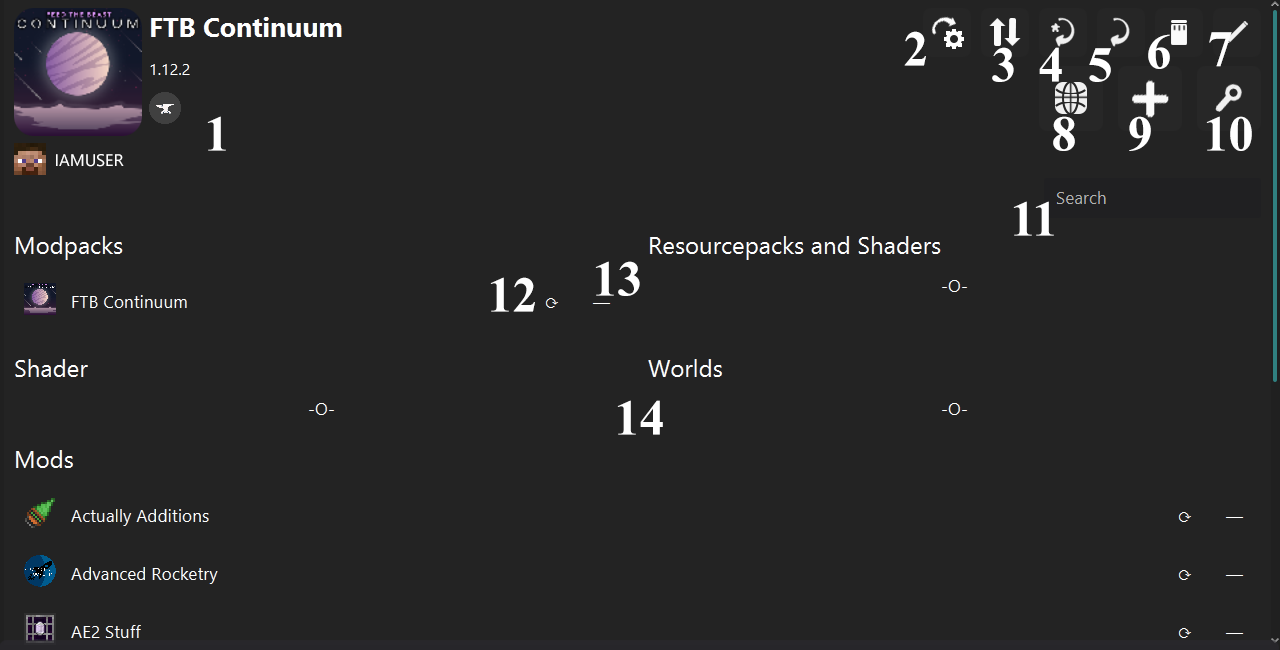
1 - 2 - 3 - 4 - 5 - 6 - 7 - 8 - 9 - 10 - 11 - 12 - 13 - 14
- Profile icon.
- Profile account head and username.
- Profile name.
- Profile game version.
- Profile loader badge.
Copies the options.txt file from another profile.
Checks all updates of the resources and dependencies, then executes.
If there are any conflicts in dependencies, a confirmation dialog appears and asks for the next operation.
Creates a compressed backup (ZIP) of the profile.
Exports the configuration of the profile.
Deletes the profile.
Opens the edit profile page.
Opens the worlds page.
Left Click opens the browser page.
Right Click opens this.
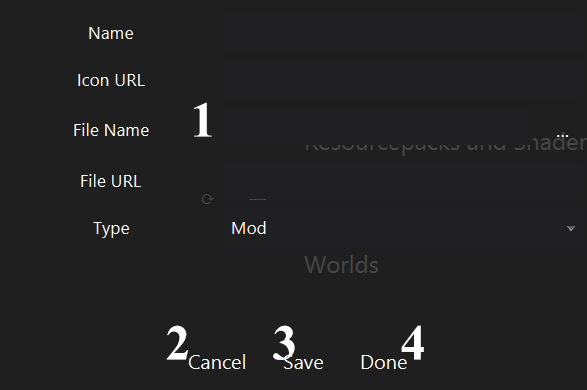
You can select a file name by clicking the ... button, or you can just type it with an extension.
Example: mymod.jar
Closes the dialog.
Creates a temporary resource from entered properties and saves it in a list.
To save a resource, you need to enter a file name and a URL to allow the launcher to download it.
Adds all resources in the list to the profile, then closes the dialog.
Opens the multiple browser page.
Searches in the profiles.
Checks the updates of the resource and dependencies, then executes.
Deletes the resource and its file.
You can drop your mod (*.jar) or resourcepack (*.zip) files here.
Launcher scans your files and extracts their name, then redirects to the multiple browser page.