frameset
Framesets are flexible structures in uiz that allow you to have a structured ui. If you are familiar with framesets from languages from html, this can create about the same result. In uiZ, structure is made using functions and not using a markup language.
A frameset is a collection of frames that have been placed in a certain structure which is made with "divisions". A divisions is a "cut" in a frame, which divides it up into multiple smaller frames. Divisions are either "horizontal" or "vertical". A divisions can exist out of multiple "cuts", and for example chopping one frame up into 3 frames for example.
Every time you create a division, an "anchor" is placed, and all new frames will be the child of this "anchor". An anchor is just a "in between object" which allows the uiz code to identify where divisions took place. The anchor specifies the size of the frames it contains. If a frame is divided into 3 different parts that should all be the same size, the anchor remembers that these 3 parts should have the same size. Anchors are often needed in certain functions as arguments. For instance, you have to use the anchors to get the instance ids of the new objects.
You can use any object in your frameset. If no object was specified, an obj_uiZ_canvas is used.
❗ Unlike other objects, a frameset is a structure and will always fill the entirety of its parent. So if you only want it to be a small part of the parent, you'd have to make a frame first.
You can give your frames inside your frameset any size you want of types px, dp, fc and xtra. Any frame sized to xtra will be processed after the size of all other frame has been calculated, and will be assigned any left space. Multiple frames can have this constant assigned, in which case any space will be divided weighted to the value given by xtra. So if you have two frames, one sized 1 xtra and the other 2 xtra, then the second frame will have twice as much space as the first frame. The size of an xtra frame is calculated using:
(how_many_xtra_for_the_given_frame)/(total_amount_of xtras)*(the_amount_of_space_left)"It is recommended to make at least one frame in every division of the xtra type, to make sure your frameset fills itself in a pixel-perfect manner. For example, making 3 frames of 0.33fc each can create a unfilled pixel line. In this example, using 3 frames of 1xtra would be better. Xtra frames may not always be the same size. In the given example, one of the frames would get an extra pixel to prevent free space.
-
frameset = uiz_frameset_create(): Currently, functionally the same as uiz_c(obj_uiZ_frameset). Creates an empty frameset object.
- frameset: The returned frameset instance id.
-
anchor = uiz_frameset_divide_horizontal/vertical(object, divisionval, valuetype[px dp fc or xtra], divisionval, valuetype[px dp fc or xtra],........): slices a frameset, or object inside a frameset into any amount of pieces. A horizontal division means that rows are created while a vertical division means that columns are created. Think of a division as a "cut" that is either horizontal or vertical. All objects created by this function are of type obj_uiZ_canvas. Requires you to have a previously created frameset. Cannot be applied to another anchor, only to a frame assigned to that anchor. You need to give this function either a frame belonging to a anchor or the frameset itself. You cannot use this function to change how the frameset is divided after it has already been divided. You can only use this function to add new divisions and add new anchors. This will take the given object and replace it with a row-anchor or a col-anchor, depending on which version of the function you called. This function will then create the amount of frames you specified (you specify it by passing an x amount of arguments) at the size you specified. If you apply this function to an object inside an anchor, and that object is NOT an obj_uiZ_canvas, the object will be DESTROYED and replaced with the anchor. If there was an canvas inside an anchor, and you supplied that to this function then the canvas would be placed as the first frame in the anchor.
- anchor: The anchor is an object that holds information about the horizontal or vertical division. It is needed to requirest individual frames created by this function.
- object: The reference to the frameset, or any object in the frameset. Do not enter a anchor id here.
- divisionval: What size (of the given type in the next argument) this frame should be.
- valuetype: what type of value this frame should have. You can choose from px, dp, fc or xtra. Please refer to the "Data types" section or the posvaltype page for more information.
- Now repeat the divisionval and valuetype argument for each frame you want to be created. You need at least two sets of values to make this function work.
-
anchor = uiz_frameset_divide_objects_horizontal/vertical(object, divisionval, valuetype[px dp fc or xtra], objectType, divisionval, valuetype[px dp fc or xtra], objectType, ........): slices a frameset, or object inside a frameset into any amount of pieces. This works like the normal uiz_frameset_divide_horizontal/vertical function, except here you can supply custom objects to be placed next to each other. If the first given objectType is set to an object of the same object_index as the object argument0, then the given object will be placed in the anchor as the first frame. Meaning all settings and children are copied over. If this is not the case, the object is DESTROYED.
- anchor: The anchor is an object that holds information about the horizontal or vertical division. It is needed to request individual frames created by this function.
- object: The reference to the frameset, or any object in the frameset. Do not enter a anchor id here.
- divisionval: What size (of the given type in the next argument) this frame should be.
- valuetype: what type of value this frame should have. You can choose from px, dp, fc or xtra. Please refer to the "Data types" section or the posvaltype page for more information.
- objectType: An object_index referring to a uiZ object you want to be placed at this position in the frameset. It will be given the size in the previous two arguments. Do not manually edit the size of this object, it is handled by the frameset.
- Now repeat the divisionval, valuetype and objectType argument for each frame you want to be created. You need at least two sets of values to make this function work.
-
uiz_frameset_setAnchorDivisions(anchor, divisions, saveChildren): Sets the amount of divisions of an anchor in a frameset. Can't set the frameset-size values of newly created frames, you'll have to use uiz_frameset_setFrameSize for that. Will destroy frames if the amount of divisions already there is lower than the amount specified. The children of such a frame will also be deleted, unless saveChildren is set to true. If the amount of required divisions is higher than the amount of existing divisions, new obj_uiZ_canvas objects are made.
- anchor: The id of a division anchor, not of a frame or frameset.
- divisions: the amount of new divisions the anchor should have.
- savechildren: Makes any children of frames that will be deleted children of the anchor, but not part of the frameset. (So there will be a misplaced object in the anchor that is not part of any frame). It is recommended to use this if you plan to do anything else with the objects after deleting some frames.
-
uiz_frameset_setFrameSize(anchor, frameNumber, value, valuetype[px dp fc xtra]): Allows you to set the size of a frame in a frameset after you used any of the uiz_frame_divide...() functions.
- anchor: The id of a division anchor, not of a frame or frameset.
- frameNumber: Which frame number you want to change. 0 refers to the first frame on the very top/left.
- value: the new size the frame should have.
- valuetype: what type of value argument2 (value) is.
-
uiz_frameset_forceFixSize(anchor): Tells an anchor that it needs to recheck the width/height of every frame. The anchor still needs to be fixed manually later on. When fixing the frameset or an individual anchor, the sizes of objects aren't always recalculated. (only after initiating any function in this list, or when the size of the frameset changes). Normally you should never have to call this function. However, if you are manually editing frameset variables or are experiencing bugs you may need to call this function on an anchor you are having trouble with.
- anchor: The id of a division anchor, not of a frame or frameset.
-
object = uiz_frameset_getObject(anchor, position): returns the given obj_uiZ_canvas, or custom provided object at the given position within a frame anchor. Please note that you cannot manually change the size
- object: The object inside of a certain frame division.
- anchor: The id of a division anchor, not of a frame or frameset.
- position: Which frame number you want to change. 0 refers to the first frame on the very top/left.
-
uiz_frameset_setCellMargins(anchor, marginWidth, marginHeight): Use this function to add a certain pixel margin around frames. The width or height of the frame itself does not increase (provided there is enough space)
- anchor: The id of a division anchor, not of a frame or frameset.
- marginWidth: How many pixels of margin there should be on the left and right of every frame in the anchor.
- marginHeight: How many pixels of margin there should be on the top and bottom of every frame in the anchor.
-
uiz_frameset_setMargins(anchor, left, right, top, bottom): Use this function to add a certain pixel margin around frames. The width or height of the frame is made smaller to create the margin.
- anchor: The id of a division anchor, not of a frame or frameset.
- left: How many pixels of margin there should be on the left of every frame in the anchor.
- right: How many pixels of margin there should be on the right of every frame in the anchor.
- top: How many pixels of margin there should be on the top of every frame in the anchor.
- bottom: How many pixels of margin there should be on the bottom of every frame in the anchor.
-
uiz_frameset_switch(instanceId): Switches horizontal divisions to vertical divisions, and vertical divisions to horizontal ones. This rotates/mirrors/flips/switches/swaps the entire frameset round. There is an example available to explain this function using a screenshot.
- instanceId: The id of a division anchor or frameset.
-
uiz_frameset_removeDivision(anchor): Undoes what a uiz_frameset_divide_... function has done. Will destroy the anchor and replace it with the first (topmost/leftmost) object in the anchor. Any other objects that were in the anchor are deleted. Any children of the objects in the anchor are adopted by the first frame in the anchor (which now replaces the anchor completely).
- anchor: The id of a division anchor, not of a frame or frameset.
-
frameset = uiz_frameset_isPartOf(object): Checks any object that is (supposedly) part of a frameset, and returns the instance id of the frameset governing the object. It returns -1 if no frameset is found.
- frameset: Returns the instance id of the frameset governing the object. It returns -1 if no frameset is found.
- object: An object, canvas or anchor which is a part of the frameset. (children of objects in the frameset don't count)
Just like in HTML, it is possible to allow the user to resize the frameset. You can do this by enabling the bar slider between specific frames.
For an example on this functionality, see the examples below.
To utilize this functionality, use these functions:
-
uiz_frameset_setBarSlider(anchor, position, enable): Adds a bar on the right/bottom side of the given frame. The user can use this bar to resize this frame (and the next frame over) by dragging the bar slider.
- anchor: The id of a division anchor, not of a frame or frameset.
- position: Which frame number you want to change. 0 refers to the first frame on the very top/left. The bar slider cannot be enabled for the last frame in the anchor.
- enable: whether the bar slider should be enabled or disabled.
-
uiz_frameset_setDividerThickness(anchor, frameBarThickness, frameBarThicknessType): sets the thickness of the slider bar between two frames. This thickness is applies to all slider bars in the anchor.
- anchor: The id of a division anchor, not of a frame or frameset.
- frameBarThickness[.1]: What thickness the frame slider bar should have.
- frameBarThicknessType[dp]: What type of thickness the frame slider bar should have.
-
uiz_frameset_setMinimumSize(anchor, position, minSize, minSizeType): Sets the minimum size of a specific cell in an anchor. Only applicable in the context of the frame slider bar.
- anchor: The id of a division anchor, not of a frame or frameset.
- position: Which frame number you want to change. 0 refers to the first frame on the very top/left.
- minSize[0]: What size a frame has to be at the very least.
- minSizeType[0]: What type of size the previous argument has. Only supports px, dp or fc.
-
uiz_frameset_setMaximumSize(anchor, position, maxSize, maxSizeType): Sets the minimum size of a specific cell in an anchor. Only applicable in the context of the frame slider bar.
- anchor: The id of a division anchor, not of a frame or frameset.
- position: Which frame number you want to change. 0 refers to the first frame on the very top/left.
- maxSize[0]: What size a frame has to be at the very most.
- maxSizeType[0]: What type of size the previous argument has. Only supports px, dp or fc.
-
uiz_frameset_setSliderSettings(anchor, sprite, texturemode_horizontal, texturemode_vertical, spriteConnectionLeft, spriteConnectionRight, spriteConnectionTop, spriteConnectionBottom, color): Sets the style and visual appearance of the frame slider bar. These settings are applied to every bar in the anchor.
- anchor: The id of a division anchor, not of a frame or frameset.
- sprite[spr_uiZ_framepullline(vertical)]: What sprite to use to draw the pull bar.
- texturemode_horizontal[uiz_texturemode_fill]: What texture mode to use to draw the slider bar in the horizontal direction. You can choose from uiz_texturemode_fill, uiz_texturemode_tile, uiz_texturemode_tilefit.
- texturemode_vertical[uiz_texturemode_fill]: What texture mode to use to draw the slider bar in the vertical direction. You can choose from uiz_texturemode_fill, uiz_texturemode_tile, uiz_texturemode_tilefit.
- spriteConnectionLeft[spr_uiZ_framepulllineconnectionleft]: What sprite to place at the left end of a horizontal slider bar to make it connect to another vertical one. Only applicable to horizontal anchors. See "connection sprites" for more info.
- spriteConnectionRight[spr_uiZ_framepulllineconnectionright]: What sprite to place at the right end of a horizontal slider bar to make it connect to another vertical one. Only applicable to horizontal anchors. See "connection sprites" for more info.
- spriteConnectionTop[spr_uiZ_framepulllineconnectiontop]: What sprite to place at the top end of a vertical slider bar to make it connect to another horizontal one. Only applicable to vertical anchors. See "connection sprites" for more info.
- spriteConnectionBottom[spr_uiZ_framepulllineconnectionbottom]: What sprite to place at the bottom end of a vertical slider bar to make it connect to another horizontal one. Only applicable to vertical anchors. See "connection sprites" for more info.
- color[c_white]: What color blend the frame bar should have.
When a horizontal and a vertical frame bar cross, a special sprite is placed to make the slide bars connect up nicely. See this image for an example:
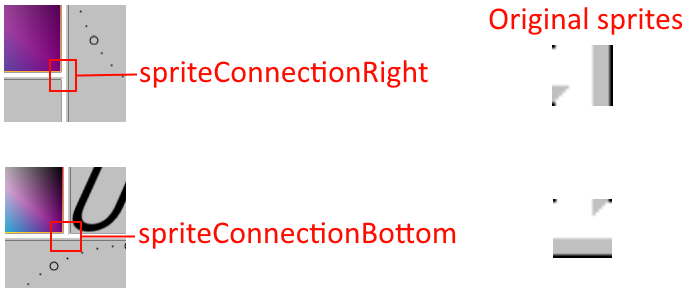
Note how the shadows on the frame bar stop at an angle, and how the small line on the edge of the bar is interrupted.
You can set what connection sprites to use using the function uiz_frameset_setSliderSettings. These sprites consist of the following sub images:
- image 0: no mouse over image
- image 1: mouse over most nested frame bar. (In the case of bottom or top sprite: vertical part of sprite. In case of left or right sprite: horizontal part of sprite)
- image 2: mouse clicks most nested frame bar. (In the case of bottom or top sprite: vertical part of sprite. In case of left or right sprite: horizontal part of sprite)
- image 3: mouse over least nested frame bar. (In the case of bottom or top sprite: horizontal part of sprite. In case of left or right sprite: vertical part of sprite)
- image 4: mouse clicks least nested frame bar. (In the case of bottom or top sprite: horizontal part of sprite. In case of left or right sprite: vertical part of sprite)
This is a simple three way division, specifying custom objects to place inside the frameset.
frameset=uiz_frameset_create()//creating the frameset
//"chop" the frame in pieces and make sure that the left frame is always 1 dp wide, the right frame always 0.1 fc wide and the middle frame whatever is left
anchor_1=uiz_frameset_divide_objects_horizontal(frameset,1,dp,obj_uiZ_button,1,xtra,obj_uiZ_gradientsquare,0.1,fc,obj_uiZ_sprite);
//get references to our frames, because we didn't specify any object types to use, we can only get obj_uiZ_canvas.
button=uiz_frameset_getObject(anchor_1,0)//the id of the top button.
grad=uiz_frameset_getObject(anchor_1,1)//the id of the middle gradientrect.
spr=uiz_frameset_getObject(anchor_1,2)//the id of a bottom sprite.
//now DON'T manually change the size or position of our objects again, this is now handled by our frame anchor.
//don't forget to fix;
uiz_fixgeneralpos(frameset);
uiz_fixgeneralpos(button);
uiz_fixgeneralpos(grad);
uiz_fixgeneralpos(spr);
The result of this code is:
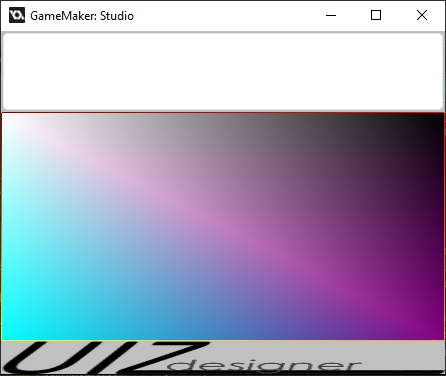
The object tree looks like:
- obj_uiZ_frameset
- obj_uiZ_framerowanchor
- obj_uiZ_button
- obj_uiZ_gradientsquare
- obj_uiZ_sprite
- obj_uiZ_framerowanchor
This is a simple three way division, without specifying custom objects to place inside the frameset. Three obj_uiZ_canvas objects are thus created and filled later on.
frameset=uiz_frameset_create()//creating the frameset
//"chop" the frame in pieces and make sure that the left frame is always 1 dp wide, the right frame always 0.1 fc wide and the middle frame whatever is left
anchor_1=uiz_frameset_divide_horizontal(frameset,1,dp,1,xtra,0.1,fc)
//get references to our frames, because we didn't specify any object types to use, we can only get obj_uiZ_canvas.
frame_top=uiz_frameset_getObject(anchor_1,0)//the id of the top canvas.
frame_middle=uiz_frameset_getObject(anchor_1,1)//the id of the middle canvas.
frame_bottom=uiz_frameset_getObject(anchor_1,2)//the id of a bottom canvas.
//We can now use these frames:
button=uiz_c(obj_uiZ_button);
uiz_setParent(button,frame_top);
button.posinframex=uiz_fill;
button.posinframey=uiz_fill;
grad=uiz_c(obj_uiZ_gradientsquare);
uiz_setParent(grad,frame_middle);
grad.posinframex=uiz_fill;
grad.posinframey=uiz_fill;
spr=uiz_c(obj_uiZ_sprite);
uiz_setParent(spr,frame_bottom);
spr.posinframex=uiz_fill;
spr.posinframey=uiz_fill;
//don't forget to fix;
uiz_fixgeneralpos(frameset);
uiz_fixgeneralpos(button);
uiz_fixgeneralpos(grad);
uiz_fixgeneralpos(spr);
Result:
The object tree looks like:
- obj_uiZ_frameset
- obj_uiZ_framerowanchor
- obj_uiZ_canvas
- obj_uiZ_button
- obj_uiZ_canvas
- obj_uiZ_gradientsquare
- obj_uiZ_canvas
- obj_uiZ_sprite
- obj_uiZ_canvas
- obj_uiZ_framerowanchor
In this example, we use both a horizontal and vertical division to show off the use of multiple divisions. This also shows how to enable the frame slider bars.
frameset = uiz_frameset_create()//creating the frameset
//make our cuts in the frameset
anchor_1 = uiz_frameset_divide_horizontal(frameset, 0.4,fc, 1,xtra);//we don't use _objects here, because we are going to replace the top panel with a vertical division anyways and because we need a canvas (or other object) to make our clock always square.
anchor_2 = uiz_frameset_divide_objects_vertical(uiz_frameset_getObject(anchor_1,0), 1,xtra,obj_uiZ_button, 1,xtra,obj_uiZ_button, 3,xtra,obj_uiZ_gradientsquare, 1,dp,obj_uiZ_sprite);
//get references to our frames, because we didn't specify any object types to use, we can only get obj_uiZ_canvas.
button_1 = uiz_frameset_getObject(anchor_2, 0)//the id of the first button.
button_2 = uiz_frameset_getObject(anchor_2, 1)//the id of the second button.
grad = uiz_frameset_getObject(anchor_2, 2)//the id of the second to last gradientrect.
spr = uiz_frameset_getObject(anchor_2, 3)//the id of a last sprite.
rightCanvas = uiz_frameset_getObject(anchor_1, 1)//the id of a right sprite.

//create clock inside or right canvas
clock = uiz_c(obj_uiZ_clock);
uiz_setParent(clock, rightCanvas);
uiz_size(clock, 1, fcmin, 1, fcmin);
uiz_position(clock, 0, uiz_center, 0, uiz_center);//it doesn't matter what we fill in for argument 1 or 3 (starting from 0), because we use uiz_center.

//enable frame bars
uiz_frameset_setBarSlider(anchor_1, 0, true);//position 0 means between first and second frame
uiz_frameset_setBarSlider(anchor_2, 2, true);//position 1 means between second and second third
uiz_frameset_setMinimumSize(anchor_2, 2, 3, dp);//set second to last frame to minimum size of 3 dp
uiz_frameset_setMinimumSize(anchor_2, 3, .05, fc);//set last frame to minimum size of 0.05 fc
uiz_frameset_setMaximumSize(anchor_2, 2, 10, dp);//set second to last frame to maximum size of 3 dp
uiz_frameset_setMaximumSize(anchor_2, 3, .3, fc);//set last frame to maximum size of 0.05 fc

//don't forget to fix;
uiz_fixgeneralpos(frameset);
This code will yield these results:
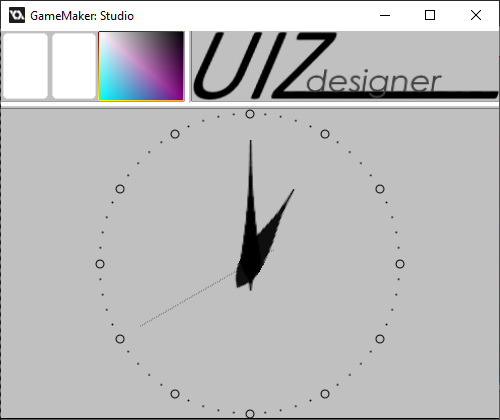
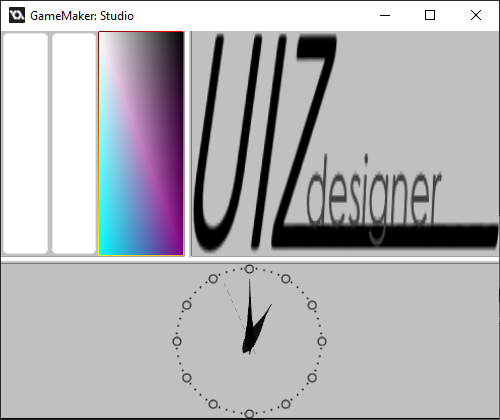
Image taken after the user moved the horizontal frame bar down. Note that the clock is still square.
this example builds upon the above "Horizontal divison and vertical devision, with always square object" example. It shows how one can use the uiz_frameset_switch function to switch/rotate/mirror/swap the entire frameset. All vertical splits will be changed to horizontal ones and vica versa.
Consider the following code in the "Space released" -event:
  //space bar released event
  uiz_frameset_switch(frameset);//does the actual switching
  uiz_fixgeneralpos(frameset);//required to update the position of all our frames
After executing this code, the above example changes to:
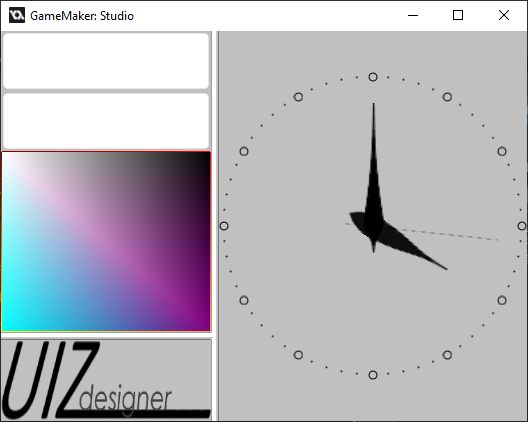
Pressing the space bar again returns the example to it's original state.