Google IO 2023 NEW Workspace Is Collaborating With Duet AI Capabilities Like ChatGPT and Midjourney
Google I/O 2023 NEW Workspace Is Collaborating With Duet AI - Capabilities Like ChatGPT & Midjourney
Full tutorial link > https://www.youtube.com/watch?v=vbPFeIH1PeA
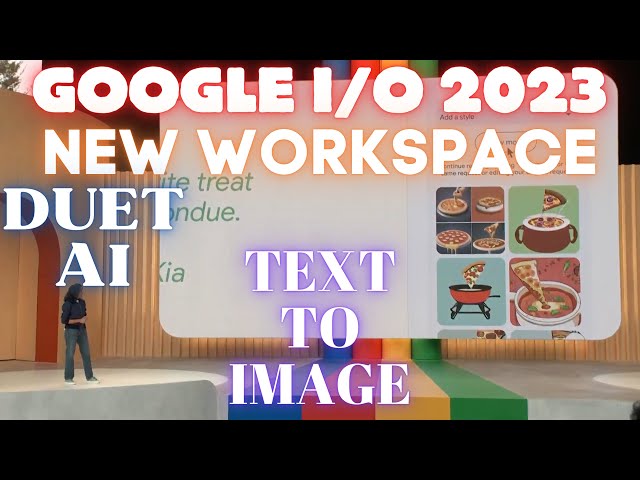











Welcome to the future of work! In this part of Google's IO 2023 event, we get a detailed look into how Google Workspace is integrating AI to transform the way we work, think, and create.
Google Workspace is now collaborating with AI in real-time, introducing features like "Help Me Write" that can assist you in writing essays, sales pitches, project plans, and more. The AI can even generate job descriptions, organize spreadsheets for your business, and add pizzazz to your Google Slides presentations.
More excitingly, Google is launching a new service called Duet AI for Workspace, which will be available for business and consumer Workspace users later this year. This new feature employs prompts to collaborate with AI, enabling you to unlock new possibilities in your work. AI can even proactively offer you prompts and make suggestions based on the context of your work, truly embodying a collaborative partner.
Watch as the speakers give real-time demonstrations of these features in action, from crafting a spooky story to preparing for a potluck, to preparing speaker notes for a big presentation. Let's step into the future of work with Google Workspace and Duet AI!
Source Google. Full Event (10 May 2023)
https://www.youtube.com/watch?v=cNfINi5CNbY
Our Discord server
https://bit.ly/SECoursesDiscord
If I have been of assistance to you and you would like to show your support for my work, please consider becoming a patron on 🥰
https://www.patreon.com/SECourses
Technology & Science: News, Tips, Tutorials, Tricks, Best Applications, Guides, Reviews
https://www.youtube.com/playlist?list=PL_pbwdIyffsnkay6X91BWb9rrfLATUMr3
Playlist of StableDiffusion Tutorials, Automatic1111 and Google Colab Guides, DreamBooth, Textual Inversion / Embedding, LoRA, AI Upscaling, Pix2Pix, Img2Img
https://www.youtube.com/playlist?list=PL_pbwdIyffsmclLl0O144nQRnezKlNdx3
#GoogleIO2023 #GoogleWorkspace #ArtificialIntelligence #CollaborativeAI #AIinWorkspace #DuetAI #FutureOfWork #AIProductivity
-
00:00:08 From the very beginning, Workspace was built to allow you to collaborate in real time
-
00:00:14 with other people. Now you can collaborate in real time with AI.
-
00:00:22 AI can act as a coach, a thought partner, a source of inspiration, as well as a productivity
-
00:00:28 booster across all of the apps of Workspace. Our first steps with AI as a collaborator
-
00:00:36 were via the Help Me Write feature in Gmail and Docs which launched to trusted testers in March.
-
00:00:45 We've been truly blown away by the clever and creative ways these features are being
-
00:00:51 used from writing essays, sales pitches, project plans, client outreach, and so much more.
-
00:00:59 Since then, we've been busy expanding these helpful features across more surfaces.
-
00:01:05 Let me show you a few examples.
-
00:01:09 One of our most popular use cases is the trustee job description.
-
00:01:14 Every business, big or small, needs to hire people.
-
00:01:17 A good job description can make all the difference.
-
00:01:21 Here's how Docs has been helping.
-
00:01:24 Say you run a fashion boutique and need to hire a textile designer.
-
00:01:28 To get started, you enter just a few words as a prompt.
-
00:01:34 Senior level job description for textile designer.
-
00:01:38 Docs will take that prompt, send it to our palm tube based model, and let's see what I got back.
-
00:01:45 Not bad. With just seven words,
-
00:01:47 the model came back with a good starting point written out really nicely for me.
-
00:01:52 Now you can take that and customize it for the kind of experience, education, and skillset
-
00:01:58 that this role needs, saving you a ton of time and effort.
-
00:02:04 Next,
-
00:02:11 let me show you how you can get more organized with Sheets.
-
00:02:16 Imagine you run a dog walking business and need to keep track of things like your clients,
-
00:02:22 logistics about the dogs, like what time they need to be walked, for how long, etc.
-
00:02:27 Sheets can help you get organized. In a new Sheet, simply type something like
-
00:02:33 client and pet roster for a dog walking business with rates and hit create.
-
00:02:40 Sheets sends this input to a fine-tuned model that we've been
-
00:02:43 training with all sorts of Sheets-specific use cases.
-
00:02:47 Look at that. The model
-
00:02:54 figured out what you might need. The generated table has things
-
00:02:58 like the dog's name, client info, notes, etc. This is a good start for you to tinker with.
-
00:03:04 Sheets made it easy for you to get started so you can go back to doing what you love.
-
00:03:11 Speaking of getting back to things you love, let's talk about Google Slides.
-
00:03:15 People use Slides for storytelling all the time, whether at work or in their personal lives.
-
00:03:23 For example, you get your extended family to collect anecdotes, haikus, jokes for your
-
00:03:29 parents' 50th wedding anniversary in a Slide deck.
-
00:03:33 Everyone does their bit, but maybe this deck could have more pizzazz.
-
00:03:38 Let's pick one of the slides and use the poem on there as a prompt for image generation.
-
00:03:46 Mom loves her pizza, cheesy and true, while dad's favorite treat is a warm pot of fondue.
-
00:03:52 Create and see what it comes up with.
-
00:03:56 Behind the scenes, that quote is sent as an input to our texture image models.
-
00:03:59 We know it's unlikely that the user will be happy with just one option, so we generate
-
00:04:04 about six to eight images so that you have the ability to choose and refine.
-
00:04:09 Whoa. I have
-
00:04:11 some oddly delicious-looking fondue pizza images.
-
00:04:15 Now, this style's a little too cartoony for me, so I'm going to ask it to try again.
-
00:04:20 Let's change the style to photography and give it a whirl.
-
00:04:27 Just as weird, but it works for me.
-
00:04:35 You can have endless fun with this with no limits on cheesiness or creativity.
-
00:04:42 Starting next month, trusted testers will be able to try this and six
-
00:04:47 more generative AI features across Workspace. And later this year, all of this will be generally
-
00:04:54 available to business and consumer Workspace users via a new
-
00:04:59 service called Duet AI for Workspace. Stepping back a bit, I showed you a few powerful
-
00:05:13 examples of how Workspace can help you get more done with just a few words as prompts.
-
00:05:21 Prompts are a powerful way of collaborating with AI.
-
00:05:24 The right prompt can unlock far more from these models.
-
00:05:29 However, it can be daunting for many of us to even know where to start.
-
00:05:34 Well, what if we could solve that for you? What if AI could proactively offer you prompts?
-
00:05:42 Even better, what if these prompts were actually
-
00:05:46 contextual and changed based on what you're working on?
-
00:05:50 I am super excited to show you a preview of just that.
-
00:05:55 This is how we see the future of collaboration with AI coming to life.
-
00:06:00 Let's switch to a live demo so I can show you what I mean.
-
00:06:04 Tony's here to help me with that. Hey, Tony.
-
00:06:06 Hey, Aparna. So,
-
00:06:13 my niece Mira and I are working on a spooky story together for summer camp.
-
00:06:18 We've already written a few paragraphs, but now we're stuck.
-
00:06:23 Let's get some help. As you can see, we've launched a side panel,
-
00:06:29 something the team fondly calls Sidekick. Sidekick instantly reads and processes the
-
00:06:37 document and offers some really neat suggestions along with an open prompt dialogue.
-
00:06:43 If we look closely, we can see some of the suggestions like
-
00:06:47 what happened to the golden seashell? What are common mystery plot twists?
-
00:06:53 Let's try the seashell option and see what it comes back with.
-
00:06:57 Now, what's happening behind the scenes is that we've provided the entire document as context to
-
00:07:01 the model along with the suggested prompt, and let's see what we got back.
-
00:07:06 The golden seashell was eaten by a giant squid that lives in the cove.
-
00:07:10 This is a good start. Let's insert these as notes
-
00:07:14 so that we can continue our little project. Now, one of the interesting observations we
-
00:07:21 have is that it's actually easier to react to something or perhaps use that to say,
-
00:07:25 hmm, I want to go in a different direction. And this is exactly what AI can help with.
-
00:07:31 I see a new suggestion on there for generating images.
-
00:07:34 Let's see what this does. The story has a village,
-
00:07:38 a golden seashell, and other details. And instead of having to type all of that out,
-
00:07:42 the model picks up these details from the document and generates images.
-
00:07:48 These are some cool pictures, and I bet my niece will love these.
-
00:07:51 Let's insert them into the doc for fun. Thank you, Tony.
-
00:08:03 I'm going to walk you through some more examples, and this will help you see why this powerful,
-
00:08:08 new, contextual collaboration is such a remarkable boost to productivity and creativity.
-
00:08:16 Say you're writing to your neighbors about an upcoming potluck.
-
00:08:19 Now, as you can see, Sidekick has summarized what this conversation is about.
-
00:08:25 Last year, everyone brought hummus. Who doesn't love hummus?
-
00:08:30 But this year, you want a little more variety. Let's see what people signed up to bring.
-
00:08:36 Now, somewhere in this thread is a Google Sheet where you've collected that information.
-
00:08:41 You can get some help by typing.
-
00:08:44 Write a note about the main dishes people are bringing, and let's see what we get back.
-
00:08:53 Go. Awesome.
-
00:08:55 It found the right sheet and cited the source in the found in section,
-
00:09:00 giving you confidence that this is not made up.
-
00:09:03 Looks good. You can insert it directly into your email.
-
00:09:09 Let's end with an example of how this can help you at work.
-
00:09:14 Say you're about to give an important presentation, and you've been so focused
-
00:09:19 on the content that you forgot to prepare speaker notes.
-
00:09:23 The presentation is in an hour. Uh-oh.
-
00:09:28 No need to panic. Look at what one of the suggestions is.
-
00:09:32 Create speaker notes for each slide. Let's see what happened.
-
00:09:44 What happened behind the scenes here is that the presentation and other relevant
-
00:09:47 context was sent to the model to help create these notes.
-
00:09:51 Once you've reviewed them, you can hit insert and edit the notes to convey what you intended.
-
00:09:59 So you can now deliver the presentation without worrying about the notes.
-
00:10:03 As you can see, we've been having a ton of fun playing with this.
-
00:10:08 We can see the true potential of AI as a collaborator,
-
00:10:12 and we'll be bringing this experience to Duet AI for Workspace.
-
00:10:17 With that, I'll hand it back to Sundar. Thank you.