Revolutionizing Development Building AI Assistants With New GPT 4 Persistent Threads Functions
Full tutorial link > https://www.youtube.com/watch?v=cnVlYm9j9h4
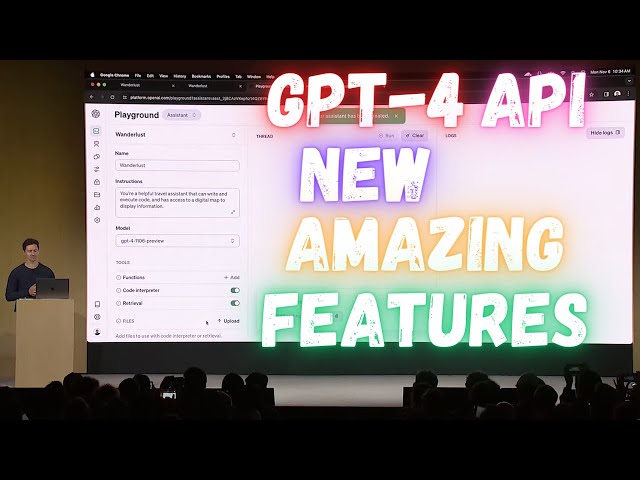











This video is Part 6 of #OpenAI #DevDay #GPT
Full Event : https://www.youtube.com/watch?v=U9mJuUkhUzk
Credits : https://www.youtube.com/watch?v=U9mJuUkhUzk
Embark on a journey through the frontier of software development with our latest video, "Revolutionizing Development: Building AI Assistants with the New Assistance API." Dive into the heart of innovation as we unravel the capabilities of the newest API designed to streamline the creation of intelligent agents. From the collaborative power of Shopify's sidekick to the customizable nature of Discord's moderator bots, witness firsthand how these tools have transformed but also challenged the development landscape. We're unveiling an easier way to build custom assistant experiences with our assistance API that boasts persistent threads, built-in retrieval, and a sandboxed Python interpreter. Get a front-row seat to a live demo led by our head of developer experience, showcasing the seamless integration of AI and UI, the simplicity of adding interactive assistants to apps, and the powerful new developer tools at your fingertips. Whether you're building the next big travel app or an innovative chatbot, this video is your gateway to mastering the assistance API and injecting AI into your projects with unprecedented ease.
00:00:00 🌐 Developers can build AI assistants using the new Assistance API, making it easier to create custom assistant experiences.
00:00:56 🧰 The Assistance API includes features like persistent threads, retrieval code interpreter, Python interpreter, and sandbox environment to simplify assistant development.
00:02:44 📝 Developers can easily create assistants with the Assistance API by specifying a model, tools, and integrating with threads and messages.
00:03:35 🔄 Function calling in the API now supports JSON output with no added latency and the ability to invoke multiple functions simultaneously.
00:04:29 📚 Retrieval capabilities allow assistants to extract knowledge from documents, making it easier to provide information and interact with files.
00:05:19 The new stateful API simplifies handling conversation history and context, reducing complexity for developers while providing transparency in the developer dashboard.
-
00:00:00 But this is a developer conference, and the coolest thing about this is that we're bringing
-
00:00:04 the same concept to the API. Many of you have already been building agent-like experiences
-
00:00:16 on the API. For example, Shopify's Sidekick, which lets you take actions on the platform;
-
00:00:23 Discord's CDE lets Discord moderators create custom personalities for; and Snap's My AI,
-
00:00:30 a customized chatbot that can be added to group chats and make recommendations. These
-
00:00:34 experiences are great, but they have been hard to build, sometimes taking months,
-
00:00:40 teams of dozens of engineers. There's a lot to handle to make this custom
-
00:00:44 assistant experience. So today, we're making that a lot easier with our new Assistance API.
-
00:00:56 The Assistance API includes persistent threads, so you don't have to figure out
-
00:01:00 how to deal with long conversation history, a built-in retrieval code interpreter,
-
00:01:06 a working Python interpreter, and a sandbox environment, and of course,
-
00:01:10 the improved function calling that we talked about earlier. So we'd like to show you a
-
00:01:16 demo of how this works, and here is Raman, our head of developer experience. Welcome.
-
00:01:20 R: Thank you, S. Good morning! Wow, it's fantastic to see you all here. It's been so inspiring to see
-
00:01:33 so many of you infusing AI into your apps. Today, we're launching new modalities in the API, but
-
00:01:40 we are also very excited to improve the developer experience for you all to build assistive agents.
-
00:01:46 So, let's dive right in. Imagine I'm building Wust, a travel app for global explorers,
-
00:01:52 and this is the landing page. I've actually used GP4 to come up with these destination ideas,
-
00:01:57 and for those of you with a keen eye, these illustrations are generated programmatically
-
00:02:02 using the new DALL-E 3 API, available to all of you today. So it's pretty remarkable. But let's
-
00:02:09 enhance this app by adding a very simple assistant to it. This is the screen we're going to come
-
00:02:14 back to in a second. First, I'm going to switch over to the new Assistant Playground. Creating
-
00:02:19 an assistant is easy; you just give it a name, some initial instructions, a model—in this case,
-
00:02:25 I'll pick GP4 Turbo—and here, I'll also go ahead and select some tools. I'll turn
-
00:02:30 on the code interpreter and retrieval and save. And that's it! Our assistant is ready to go. Next,
-
00:02:38 I can integrate with two new primitives of this Assistance API: threads and messages. Let's take a
-
00:02:44 quick look at the code. The process here is very simple. For each new user, I will create a new
-
00:02:51 thread, and as these users engage with their assistant, I will add their messages to the
-
00:02:56 threads—very simple. And then, I can simply run the assistant at any time to stream the responses
-
00:03:02 back to the app. So, we can return to the app and try that in action. If I say, "Hey, let's go to
-
00:03:10 Paris." Alright, that's it. With just a few lines of code, users can now have a very specialized
-
00:03:18 assistant right inside the app. And I'd like to highlight one of my favorite features here:
-
00:03:24 function calling. If you have not used it yet, function calling is really powerful,
-
00:03:29 and as Sam mentioned, we're taking it a step further today. It now guarantees JSON output
-
00:03:35 with no added latency, and you can invoke multiple functions at once for the first time. So here,
-
00:03:41 if I carry on and say, "Hey, what are the top 10 things to do?" I'll have the assistant respond
-
00:03:49 to that again, and here, what's interesting is that the assistant knows about functions,
-
00:03:54 including those to annotate the map that you see on the right. And so now,
-
00:03:58 all of these pins are dropping in real-time here. Yeah, it's pretty
-
00:04:03 cool. And that integration allows our natural language interface to interact
-
00:04:12 fluidly with components and features of our app, and it truly showcases now the harmony
-
00:04:17 you can build between AI and UI, where the assistant is actually taking action. But next,
-
00:04:24 let's talk about retrieval. And retrieval is about giving our assistant more knowledge beyond the
-
00:04:29 immediate user messages. In fact, I got inspired, and I already booked my tickets to uh, to Paris,
-
00:04:35 so I'm just going to drag and drop here this PDF. While it's uploading, I can just sneak
-
00:04:40 peek at it—very typical United flight ticket. And behind the scene here, what's happening is
-
00:04:46 that retrieval is reading these files, and boom, the information about this PDF appeared on the
-
00:04:52 screen. And this is, of course, a very tiny PDF, but assistants can parse long-form documents from
-
00:05:01 extensive text to intricate product specs, depending on what you're building. In fact,
-
00:05:05 I also booked an Airbnb, so I'm just going to drag that over to the conversation as well.
-
00:05:10 And by the way, we've heard from so many of you developers how hard that is to build yourself.
-
00:05:15 You typically need to compute embeddings, you need to set up chunking algorithms. Now,
-
00:05:19 all of that is taken care of. And there's more than retrieval. With every API call,
-
00:05:25 you usually need to resend the entire conversation history, which means setting up a key-value store,
-
00:05:31 that means like handling the context window, serializing messages, and so forth. That
-
00:05:36 complexity now completely goes away with this new stateful API. But just because Aonia is managing
-
00:05:42 this API does not mean it's a black box. In fact, you can see the steps that the tools are taking
-
00:05:48 right inside your developer dashboard. So here, if I go ahead and click on threads, this is the
-
00:05:54 thread I believe we're currently working on, and see, like these are all the steps incl the fun